Greater Results Transparency and Enhanced Assessment Controls
By Team Lean Agile Intelligence
This release introduces several enhancements designed to provide greater transparency into Results, improve scoring consistency, and give administrators more control over how assessments are configured.
From clearly distinguishing current-period data from carried-forward data, to improving how Override votes are weighted and expanding Improvement Action filters across Results, these updates make it easier to understand your data and configure assessments to fit your organization's needs.
We've also introduced new Template Controls and several usability improvements throughout the platform.
📊 Greater Transparency Into Current and Carried-Forward Results
Understanding exactly what data is represented in Results is essential when analyzing performance over time.
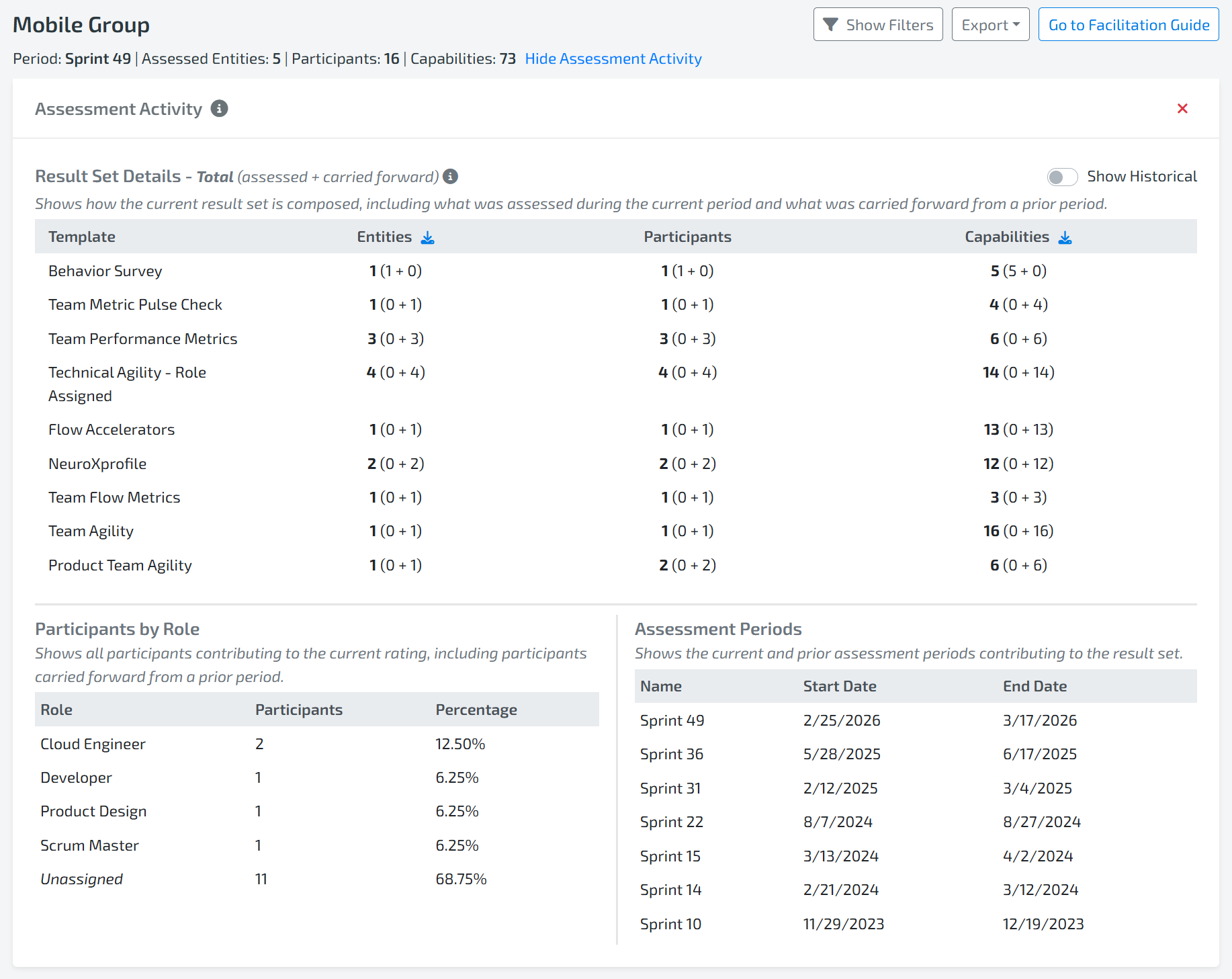
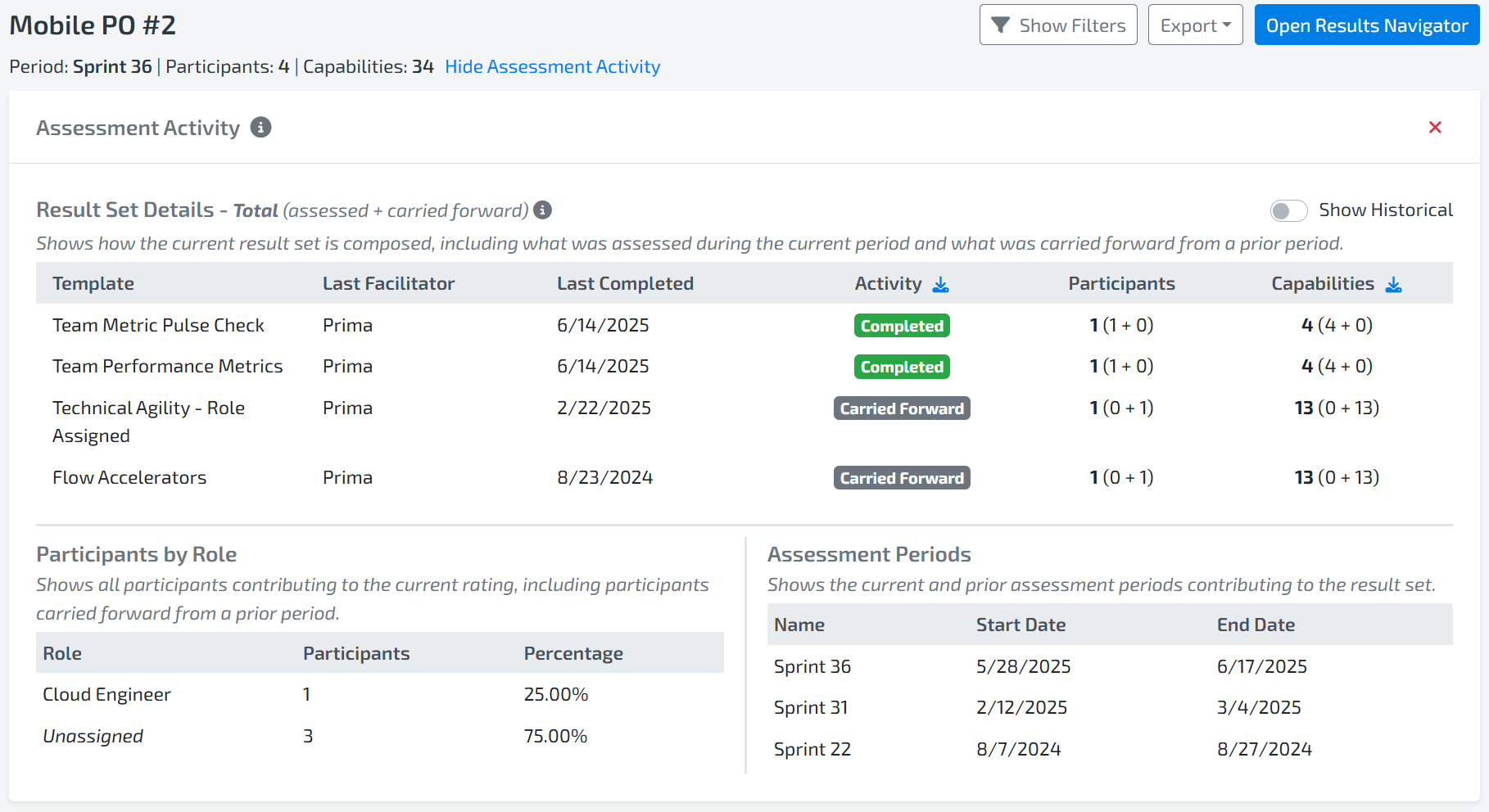
The Assessment Activity widget (previously known as Result Information) now provides greater visibility into the data included in your Results by breaking down Entity, Participant, and Capability counts based on whether they were assessed during the current period or carried forward from a previous period.
This makes it easier to understand:
- How much of the displayed data comes from the current assessment period.
- How much data has been carried forward from previous periods.
- Which Entities and Capabilities contribute to the Results being analyzed.
Additionally, users can now export Entity and Capability information to identify which items have been carried forward from previous periods.
These enhancements provide greater context around Results and make it easier to understand the data behind the numbers.
Learn more about the Assessment Activity widget here.
🔎 Improvement Action Filters Across All Results Dashboards

Improvement Action information is useful beyond the Improvement Action dashboard itself.
The following Improvement Action filters are now available across all Results dashboards:
- Improvement Action Type
- Owner Team Role
- State
This allows users to apply Improvement Action context while exploring different views of their Results, making it easier to focus analysis on the improvement work that matters most.
The Capability filter Improvement Actions has also been removed because its functionality is now covered by the State filter, reducing redundancy and simplifying the filtering experience.
Learn more about Insights Canva Filter here.
🎛️ New Template Controls for Abstain Votes and Participant Settings
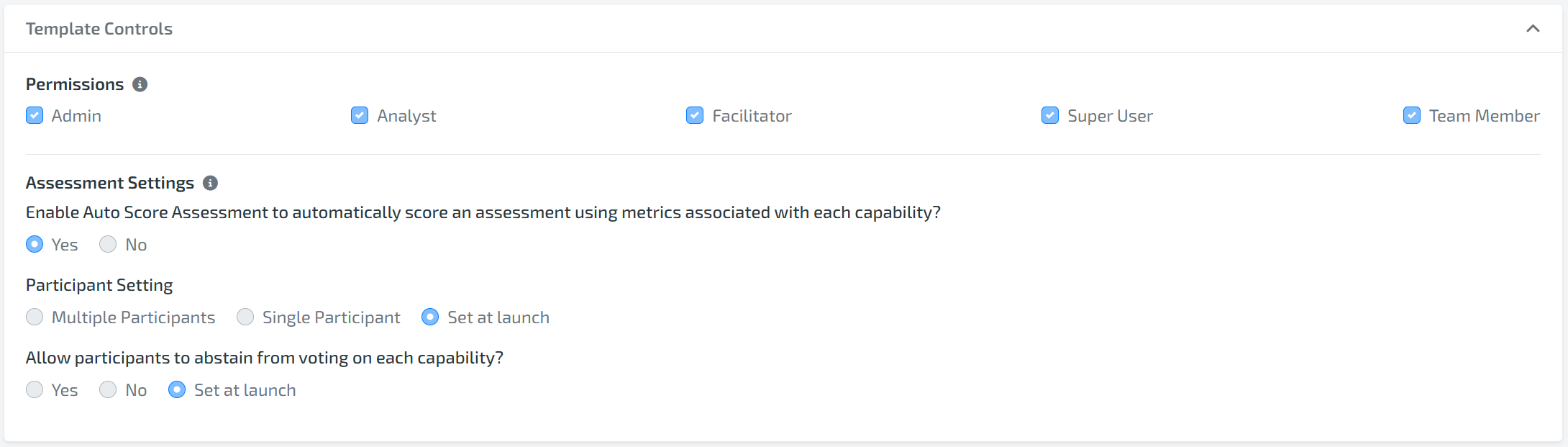
Administrators now have greater control over how Facilitators configure assessments relating to Abstain voting and Participant setting created from specific templates.
Abstain Voting & Participant Setting
Within the Template Builder, Administrators can configure a template to:
- Always allow Abstain vote.
- Never allow Abstain votes.
- Allow the Facilitator to decide when launching the assessment.
Participant Settings
Templates can now be configured to:
- Always use Multiple Participant Setting.
- Always use Single Participant Setting.
- Allow the Facilitator to choose when launching the assessment.
Again, allowing the Facilitator to choose remains the default. These new Template Controls help organizations create more consistent assessment experiences while still allowing flexibility when needed.
Learn more about Customizing Capability Templates here.
🤖 Auto Score Now Supports Abstain for Missing Data
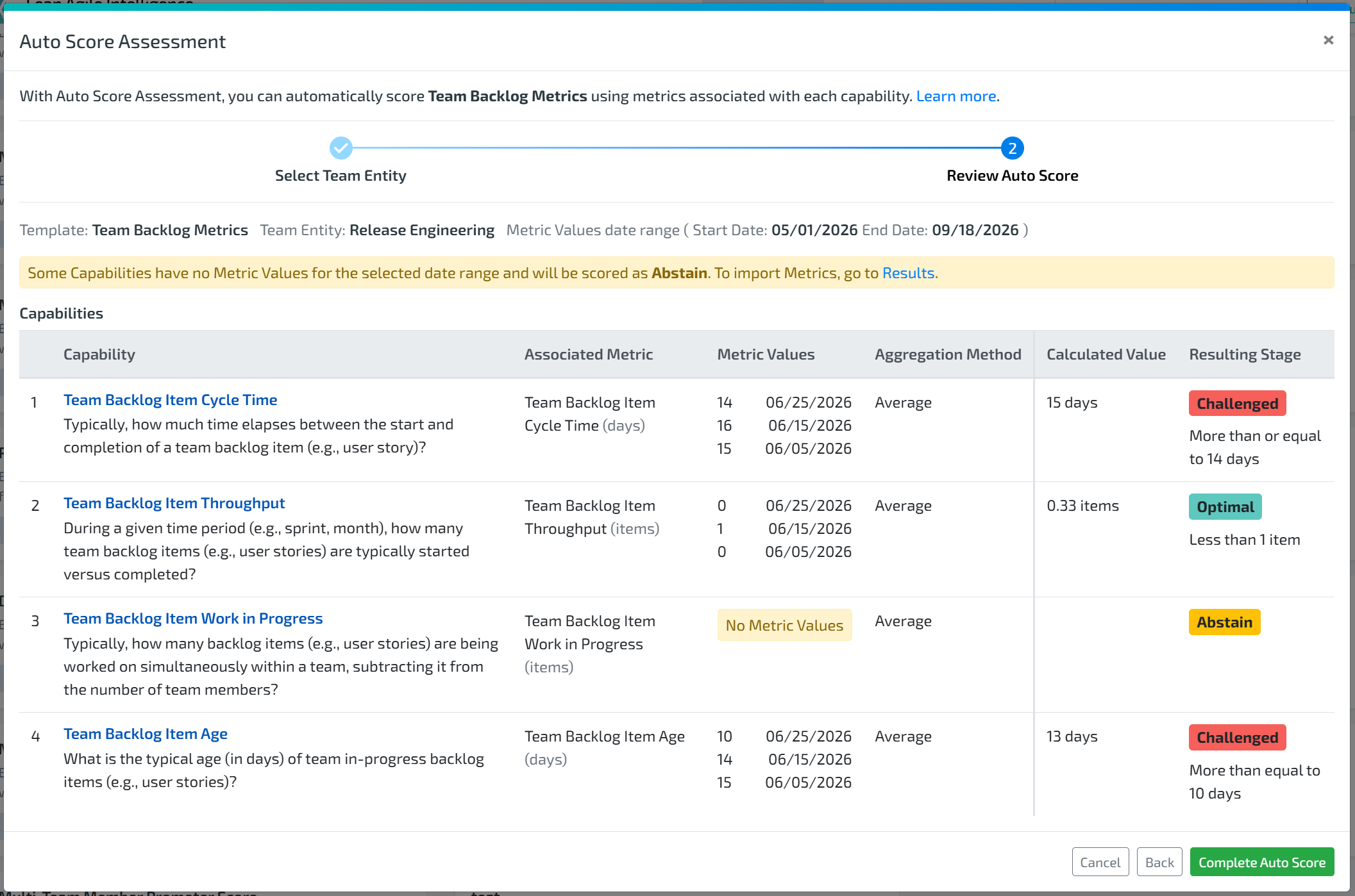
Auto Score assessments can now be completed even when required metric data is missing.
When there isn't enough data to calculate a Capability rating, Auto Score will mark that Capability as Abstain rather than preventing the assessment from being completed.
This makes it easier to:
- Complete Auto Score assessments with incomplete metric data.
- Clearly identify Capabilities that could not be scored.
- Distinguish missing data from an actual performance rating.
When the required metrics are available, Auto Score will continue to calculate the Capability rating as usual.
Learn more about Auto Score Assessments here.
✨ Additional Improvements
This release also includes several smaller enhancements designed to make assessments, Results, and administration easier to use.
- 🧭 Improved Prioritize Capabilities Layout: The Prioritize Capabilities step in Results Navigator now uses a one-pane layout instead of a two-pane layout, providing more on-screen space to view and work with Capabilities.
- ✏️ Edit Completed Responses in Separate Mode: Separate Mode participants can now return to and edit their responses after completing their assessment, as long as the assessment is still In Progress.
- ☑️ Select All and Clear All for Filters: Select All and Clear All options are now available across many filter dropdowns, making it faster to manage larger sets of filter selections.
- 📈 Cleaner Overall Rating Breakdown Trends: The Overall Rating Breakdown widget will now hide the First trend by default when it is the same as the Previous trend, reducing unnecessary duplicate information.
- 🔐 SAML 2.0 RelayState Support: SSO integrations using SAML 2.0 now support RelayState.
- ⚖️ Override Vote Weighting: Override is weighted based on the number of participants who voted in the assessment.
- 🔗 Improved Helpful Resources Editing: The format for editing Helpful Resources in the Template Builder has been improved for a cleaner and easier editing experience.
- 📋 Manage Assessments Updates: Minor column name updates have been made in Manage Assessments to improve clarity and consistency.
Together, these updates provide greater transparency into the data behind Results, improve the consistency of assessment scoring, and give organizations more control over how assessments are configured.
Whether you're analyzing current versus carried-forward Results, using Improvement Action filters to explore organizational performance, or creating standardized assessment experiences through Template Controls, these enhancements are designed to make Lean Agile Intelligence more flexible, transparent, and easier to use.
Stay tuned for more updates, and thank you for being part of the Lean Agile Intelligence community.